Posted on

AGCO Machine Trouble Code 95 – SPN 100 – FMI 31 Oil Pressure Sensor Defect

AGCO Machine

This instruction show you guide on how to solve AGCO machine trouble 95 – SPN 100 – FMI 31 oil pressure sensor defect fault.

The measured oil pressure sensor signal is too high (more than 1.3 V or more than 200 kPa (29 psi), when engine is not running.

AGCO Machine

Related Contents:

AGCO 2×4 CANUSB Interface Diagnostics

AGCO EDT Electronic Diagnostic Tool


Failure Mode

Fault code is stored and oil pressure warning lamp is activated. Engine power will be reduced (FL1). CAN message indicates active fault. Engine protection functions on oil pressure are not active. No recovery before system reset.

IMPORTANT: Engine oil pressure protection is not active. The engine may be damaged, if oil pressure is too low.


Possible Cause

Oil pressure sensor wiring is defective

Oil pressure sensor power supply is not correct

Oil pressure sensor is defective

Control unit is defective


Diagnosis and Solution

Check the oil pressure sensor wiring, connectors and contact surfaces of the connector pins (possible oxidation).

Oil Pressure Sensor


Check the 5 V power supply to the sensor.

Oil Pressure Sensor


Check the oil pressure sensor operation.

Oil Pressure Sensor


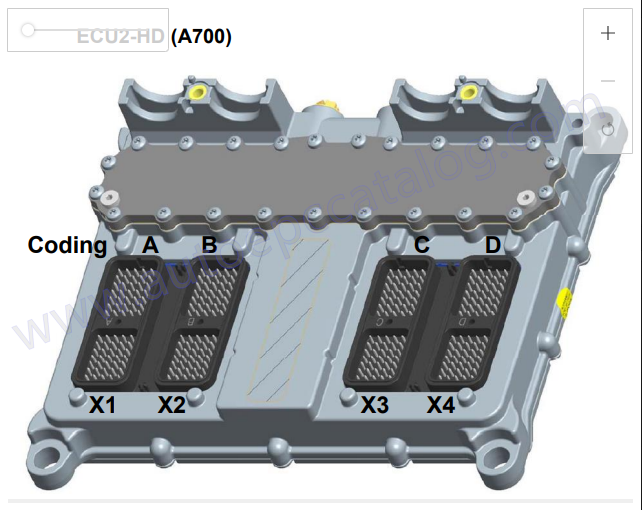
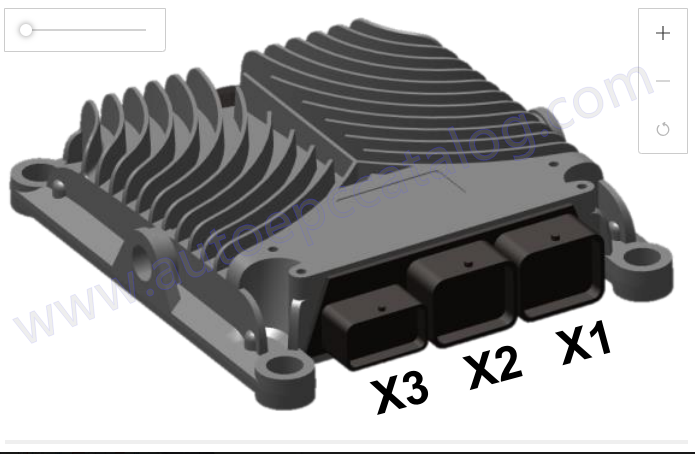
Check the ECU operation with another EEM3 controller. If the system is functional and the fault is not active with the replacement ECU, then the original ECU is defective.

ECU Replacement

Posted on

Valtra BH Series 140-210 Internal Lateral Axis Inertial Sensor Error

Valtra BH Series 140-210

How to solve Valtra BH Series 140-210 trouble code SA 28 – SPN 520218 FMI 02 internal lateral axis inertial sensor is outside its normal operating range.

The guidance controller has detected the signal from the internal inertial sensor which measures lateral acceleration is outside of its normal operating range.

The guidance controller uses inertial sensors to assist with guidance and improve accuracy on undulating terrain. The inertial sensors are inside of the guidance controller and are unserviceable in the event of failure.

Valtra BH Series 140-210

Related Contents:

AGCO 2×4 CANUSB Interface Diagnostics

AGCO EDT Electronic Diagnostic Tool


Failure Mode Indicator

FMI 02 – Erratic, intermittent, or incorrect


Diagnosis and Solution

1 STOP THE VEHICLE

  1. Bring the vehicle to a complete stop to eliminate any acceleration on inertial sensor.


Expected Result:

Diagnostic fault code no longer exists.


Results:

  • YES – The system reported a false diagnostic.

Repair: Report false diagnostic.


Proceed to step 3

  • NO – Diagnostic fault code exists.

Repair: Repower the guidance controller.

Proceed to step 2


2 REPOWER THE GUIDANCE CONTROLLER

a Disconnect power to the guidance controller via the appropriate switch for 30 seconds.

b Reconnect power to the guidance controller.


Expected Result:

Diagnostic fault code no longer exists.


Results:

  • YES – The system reported a false diagnostic.

Repair: Report false diagnostic.

Proceed to step 3.

  • NO – The guidance controller has a hardware failure.

Repair: The guidance controller requires replacement per customer’s warranty/replacement plan

STOP.


3 REPORT FALSE DIAGNOSTIC

a Report the false diagnostic to AGCO Technical Support.

b Customer may resume operation of system.

c Ask customer to monitor system in case the error reappears.

STOP.

Posted on

How to Use CAT ET 2025A Diagnostic Software Test ECM Mode

Caterpillar C9 Engine

Caterpillar ET 2025A Test ECM Mode transforms an ECM into a Test ECM for diagnostic purposes.Here is a instruction show you guide on how to use CAT ET 2025A test ECM mode.

Note: After activating Test ECM Mode, the ECM will remain in Test ECM Mode for 24 engine hours unless deactivated. If a longer diagnostic test is required, then the Test ECM Mode will have to be reactivated before the 24-hour period expires.

Caterpillar C9 Engine

Related Contents:

CAT ET 2025A

CAT Comm 3 478-0235

Caterpillar 18 digits factory password calculator


Accessing

To place an ECM into ECM Test Mode, select “ECM Mode” from the Service menu.


Screen Layout

The Test ECM Mode screen consists of the Time Area, The Status Line, and the Instruction Area:


Time Area

The Time Area occupies the top of the Test ECM Mode screen and it displays the time remaining in Test ECM Mode. When the time remaining reaches 1 hour, the service tool enlarges the display of the Time Area and displays the following message on the Status Line: “Less than 1 hour of test ECM time remaining.”


Status Line

The Status Line occupies the center of the Test ECM Mode screen. It displays whether the ECM is Active, Not Active, or Reactivating. If Test ECM Mode is to continue beyond the 24 engine hour period, the ECM must be reactivated.


Instruction Area

The Instruction Area occupies the lower portion of the Test ECM Mode screen. It displays instructions, constraints, and usage tips for the Test ECM Mode.


Buttons

The following buttons are available on the Test ECM Mode screen:

Activate/Reactivate – Select the Activate button to begin Test ECM mode. While Test ECM Mode is active, the Activate button changes to the Reactivate button, which will allow the ECM to remain in Test ECM Mode beyond the default 24 engine-hour time limit.

Note: An ECM cannot be activated if the ECM has expired from test mode (the engine serial number has been permanently programmed into the ECM) or if engine or vehicle speeds are present.


Terminate-Select this button to bring the ECM out of Test ECM Mode and back to its standard operating mode.

Posted on

Deutz Engine EMR3 81/703 Engine Error Lamp Solution

Deutz EMR3 engine control unit ArHt1.

This is instruction show you guide on how to solve Deutz engine EMR3 81 / 703 / ESLpCD Error description ENG. RUNNING LAMP.


Indicator lamp for engine running: the current drain measured by

ECU is out of the target range or the maximum permissible temperature of the ECU component for power supply of the lamp is exceeded.

Deutz EMR3 engine control unit ArHt1.

Related Contents:

Deutz Serdia 4.0

Deutz DECOM


Error Codes

DEUTZ-Errorcode: 81

BlinkCode (short-long-short): 1 – 4 – 2

SPN: 703


Possible FMI:

3: Voltage to high or short circuit to +Ubatt

4: Voltage to low or short circuit to -Ubatt

5: current to low or broken wire

2: data stream is defective


Error Detection

Error lamp shows permanent light. Entry in errormemory.


Possible Reason for Error

Cable break or internal ECU error, lamp defective, connection cable damaged


Take Actions for Error Repair

Check cabling and load, check lamp and if necessary replace it,

check connection cable and if necessary repair or replace it other error properties


System reaction:Warning, shutoff output

Behaviour error lamp: permanent light

Selfhealing: no

Signal Priority: 1

Measurement @ errortime: shut off value

Posted on

Doosan Stage V Machine U1028 DEF Quality Sensor Open Circuit Solution

Doosan Stage V Machine U1028 DEF Quality Sensor Open Circuit (2)

Here is the instruction show you guide on how to solve Doosan Stage V machine U1028 DEF quality sensor open circuit solution.


Preparations:

2025 Doosan Data Monitoring System DMS-5

2024 Doosan Diagnostic Software Full Package

Doosan uVIM Diagnostic Tool


1 Overview:

“E” SPNFMI  E00352003

REASON

1 Electrical problem (Faulty DEF quality sensor, Wiring harness in the DEF module)

2 Electrical problem (CAN wiring harness-insulation,Resistance)

EFFECT Inducement Group5(Tampering)


The pin definition is dependent on the DEF tank type.

Doosan Stage V Machine U1028 DEF Quality Sensor Open Circuit (1)


2 Component Location

DEF tank location and connector is dependent on machine application.

Doosan Stage V Machine U1028 DEF Quality Sensor Open Circuit (2)


3 Condition for Running Diagnostic

Continuously checked in every sample time when there is no bus-off and no timeout error


4 Condition for Setting the Fault Code

The error is reported if its FMI is equal to 3 (Open circuit)


5 Condition for Clearing the Fault Code

The error is healed when its FMI is not equal to 3


6 Check List

Doosan Stage V Machine U1028 DEF Quality Sensor Open Circuit (3)

Posted on

How to Install Right-Hand Drum Bearing for CLAAS Lexion 480 Combine

How to Install Right-Hand Drum Bearing for CLAAS Lexion 480 Combine

This instruction show you guide on how to install right-hand drum bearing for CLAAS Lexion 480 combine agricultural machine.


Related Content:

NEW CLAAS Diagnostic Interface 4 CAN

CLAAS Webtic Offline Repair and Service

CLAAS CDS 7.5 Diagnostic System 2021.05


1 The flanged shaft (1), taper lock sleeve (5) and the spherical roller bearing (6) should all be dry and free of grease.

2 Pre-assemble the bearing housings (4 and 7) with taper lock sleeve (5) and the spherical roller bearing (6).

Place this complete assembly plus the felt strips (3 and 8) and the spacer (2) on the shaft end.

3 Fit the M 12 x 100 bolts through the bearing assembly and the spacer (2) and fit into the assembly cover.

How to Install Right-Hand Drum Bearing for CLAAS Lexion 480 Combine

4 From serial no. …: Tighten the M 65 x 2 face-end slotted nut (10) to 55 Nm using the special tool (part no. 181 614.0),then continue tightening by 64° and then to the next slot position, matching it with the securing tab (9). Tap tab down into the slot.

Up to serial no. …:

Tighten the M 60 x 2 face-end slotted nut (10) to 45 Nm using the special tool (part no. 180 143.0),then continue tightening by 64° and then to the next slot position, matching it with the securing tab (9). Tap tab down into the slot.

5 Refit the grease pipe. Remove the wooden block and refit the cover.

6 Slide on the V-belt pulley, align it and lock it in position with the gib head key.

If necessary, Installing the threshing drum reduction gearbox

7 Install the V-belt (K) and adjust it, Installing and adjusting the accelerator drive belt (24).

Tension the jockey pulley (P) in the same manner.


8 Refit the guard and the right-hand wheel.

Posted on

Deutz TCD 2015 V08 Engine ECU 4214432 Error Clear By HSlight II

Deutz TCD 2015 V08 Engine ECU 4214432 Error Clear By HSlight II (1)

This instruction show a guide on how to use HSlight II work with Serdia2000 to delete trouble code for Deutz TCD ECU 4214432 v08 engine 2015.


What you need?

Deutz HSlight II Diagnostic Kit with Serdia2000


Steps:

Connect HSlight II diagnostic kit on your Deutz machine,then run Serdia2000 software to do communication between Serdia2000 and engine.

Deutz TCD 2015 V08 Engine ECU 4214432 Error Clear By HSlight II (1)

Click “Error memory”–>”Error Memory 2” from menu bar

Deutz TCD 2015 V08 Engine ECU 4214432 Error Clear By HSlight II (2)

It will show you active error code as below picture

Click “Clear ECM”

Deutz TCD 2015 V08 Engine ECU 4214432 Error Clear By HSlight II (3)

Follow below guide to do it

Error memory 2 deleted!In order to update error memory,reset ECU (Ignition Off–>On) and then press OK.

Deutz TCD 2015 V08 Engine ECU 4214432 Error Clear By HSlight II (4)


After communication reconnection,click “Error memory”–>”Error Memory” from menu bar

Deutz TCD 2015 V08 Engine ECU 4214432 Error Clear By HSlight II (5)

Then just do same operation

Deutz TCD 2015 V08 Engine ECU 4214432 Error Clear By HSlight II (6) Deutz TCD 2015 V08 Engine ECU 4214432 Error Clear By HSlight II (7) Deutz TCD 2015 V08 Engine ECU 4214432 Error Clear By HSlight II (8)


Posted on

How to Solve JCB Machine Intake air temperature Sensor Error SPN 105, FMI 19

JCB EEM5

Here is the instruction show you guide on how to solve JCB machine intake air temperature sensor error code SPN 105,FMI 19.

JCB EEM5

Related Contents:
2025 JCB ServiceMaster 4 v25.1.0

2017 JCB Parts Plus+ and Repair Service Manual

JCB DLA Electronic Service Tool

2025 JCB WinEEM5 WinEEM4 JCB Service Tool 9.0


Cause

Intake air temperature sensor, temperature value implausible. Possible causes are defective wiring of the air temperature sensor or a defective air temperature sensor. The intake air temperature sensor is integrated in the boost pressure sensor.


Consequences and remedy

Save the engine all log file.

Examine the wiring and the connectors for the following components:

Intake air temperature sensor

Test if the fault code is active with another intake air temperature sensor.

Posted on

How to Bleeding the Park Brake for CASE IH 20 Series Combine

How to Bleeding the Park Brake for CASE IH 20 Series Combine

How to bleed the park brake for CASE IH 20 series Axial-Flow combine.

How to Bleeding the Park Brake for CASE IH 20 Series Combine


Related Contents:

CNH DPA5 Diagnostic Kit

2025 CNH EST 9.13 Diagnostic Software

CNH eTimGo Repair Manuals


Any time the parking brake is disassembled or lines removed, the system will require bleeding.

To bleed the system proceed as follows:


REMEMBER: As the brake switch must be depressed several times while bleeding, this job has to be done with two persons.


1 Park the combine on level ground and block the wheels adequately to prevent the combine form rolling.

2 Raise the header and engage the header safety latch. Stop the engine.

3 Remove the rubber cap (2) from the bleed screw (1).

4 Slide a transparent hose over the bleed screw to catch the oil when bleeding.

5 Start the combine engine.

6 Disengage and engage the parking brake a few times.

7 At the same time open the bleed screw until air free oil escapes through the bleed screw.

8 Engage the parking brake and stop the engine.

9 Remove the transparent hose and reinstall the rubber cap, (2).

10 Check the proper hydraulic reservoir for proper oil level.

Posted on

FENDT 900 Vario COM III Tractor B055 Sensor Foot Throttle

FENDT 900 Vario COM III Tractor B055 Sensor Foot Throttle

The B055 – Sensor, foot throttle conveys the driver’s desired torque/power.engine control unit ECD 7

FENDT 900 Vario COM III Tractor B055 Sensor Foot Throttle

What your need?

AGCO 2×4 CANUSB Diagnostic Tool

Fendt Fendias 2024v2

AGCO Fendt NA Parts Books & Workshop Service Manuals


Function:

The B055 – Sensor, foot throttle consists of two potentiometers (redundant).

Potentiometer 1 responds to the rotation of a shaft in the pedal position sensor when the foot throttle (throttle pedal) is depressed. The potentiometer mounted on the end of the shaft transmits an analogue voltage signal to the A050 – ECU,basic control unit. The A050 – ECU, basic control unit senses the exact throttle pedal position and hence the driver’s cur.rent requirement (target value) from the voltage value. So as to improve driving comfort, the throttle pedal position is regulated by a mapping field and further processed to damp it.


The voltage signal from potentiometer 1 is responsible for engine speed control, the throttle pedal module and the Tractor Management system TMS), The part of the sensor is powered by the tractor electronics A013 . PCB, microfuses.


If this voltage signal drops out, the tractor switches to emergency mode (loss of enhanced control functions). The engine speed (target value) can then only be transmitted via the foot throttle potentiometer 2, TS, throttle pedal mode and the memory buttons cannot be pre-selected.


When the foot throttle (throttle pedal) is depressed, potentiometer 2 responds to the rotation in exactly the same way.This analogue voltage signal is transmitted to the A051 – ECU, engine control unit (EDc 7). The A051 – ECU, engine control unit (EDC 7). senses the exact throttle pedal position and hence the driver’s current requirement (target value) from the voltage values. So as to improve driving comfort, the throttle pedal position is regulated by a mapping field and further processed to damp it.Both voltage sianals from the B055 . Sensor, foot throttle are compared with each other. lf control units A050 – ECU, ba.sic control unit and A051 – ECU, engine control unit (EDC 7). detect difering values to potentiometer 1 and potentiometer2, then a plausibility error is output.


Functions of the B085 – Camshaft speed sensor

Sensing the current engine position (cylinder 1 ignition)

Sensing the engine speed (camshaft speed) for emergency running characteristics

Self diagnosis


The B085 – Camshaft speed sensor is necessary for the synchronisation of the injection events. It reports the speed and

the position of the camshaft at cylinder 1 ignition. This reference mark must then match the B088 – Crankshaft speed sensor.

When the camshaft is rotating, an alternating voltage (VAC) is induced in the B085 – Camshaft speed sensor by the marks on the camshaft gear.

The A051 – ECU, engine control unit (EDC 7). calculates the camshaft speed from the voltage frequency.


The double cog (reference mark) causes a change in the frequency.

The double cog (reference mark) is used to determine the current position of the camshaft and appears once per working cycle, at TDC cylinder 1 ignition.


NOTE: Working cycle (4-stroke engine)

2 crankshaft revolutions

1 camshaft revolution


Measurement of inductive sensors

The inductive sensor receives pulses directly from a pulse generator (gearwheel or disc).

Where the magnetic field of the inductive sensor is intersected by measuring points, an AC induction voltage (VAC) is generated.


The A051 – ECU, engine control unit (EDC 7). calculates the speed from the number of voltage pulses (frequency).

The amplitude of the pulse is proportional to the speed (i.e., the voltage increases as the speed increases).


Calculation of crankshaft revs (engine speed) on the basis of the oscilloscope display

NW Camshaft gear delta t Time between voltage peaks

The A051 ECU, engine control unit calculates the speed from the number of voltage peaks.

Clearance between sensor and camshaft gear: 1.0 to 2.0 mm