Posted on

How to Solve AGCO Machine Rail Pressure HIGH Trouble?

AGCO Machine

This instruction show you guide on how to solve AGCO machine rail pressure high trouble code 382 – SPN 157 – FMI 00 Rail Pressure HIGH?

AGCO Machine

What you need?

AGCO 2×4 CANUSB

2026 AGCO EDT Diagnostic Software


Description

The measured rail pressure is over critical limit. Measured pressure is more than 1700 bar (24,656 psi). In normal conditions the pressure release valve (PRV) opens at a critical pressure (1600 to 1650 bar (23.206 to 23,931 psi)). In case PRV mechanical failure, EEM3 system continuously monitors rail pressure and if measured pressure more than 1700 bar (24,656 psi), engine will shutdown immediately.


Failure Mode Indicator

FMI 00 – Above normal operational range – most severe.


Failure Mode

Fault code is stored and warning lamp is activated. The engine will stop immediately. CAN message indicates, that shutdown is pending.


Possible Cause

  • High pressure pump is not working correctly
  • Rail pressure sensor wiring is defective
  • Rail pressure sensor power supply is not correct
  • Rail pressure sensor is defective
  • Pressure release valve (PRV) is not working correct
  • Control unit is defective


Diagnosis and Solution

  • Check the high pressure pump:
  • Look for possible high pressure pump faults and inspect accordingly (such as faults with wiring and connectors).
  • Check the high pressure pump operation with Service Tool test function or have the pump inspected by an authorized Bosch service dealer.
  • Check the rail pressure sensor wiring, connectors and contact surfaces of the connector pins (possible oxidation).


Rail Pressure Sensor

  • Check the 5 V power supply to the sensor.


Rail Pressure Sensor

Check the rail pressure sensor operation.


Rail Pressure Sensor

Check the ECU operation with another EEM3 controller. If the system is functional and the fault is not active with the replacement ECU, then the original ECU is defective.


ECU Replacement

In case of damaged pressure release valve (PRV), high pressure pump or wiring harness, replace damaged parts according service manual.

NOTE: High pressure parts removal, inspection and replacement should be performed only by qualified injection system service personnel. Special instructions may apply.
Posted on

AGCO EMM5 Machine NOx Sensor

AGCO EMM5 Machine NOx Sensor

The NOx sensor measures the nitrogen oxides level from the exhaust gas. The NOx sensors have a critical role in the emission control.


What you need?

AGCO 2×4 CANUSB

2026 AGCO EDT Diagnostic Software


ECU connection

The pin numbers at the ECU:

MD1CC878        A55 CAN Low

MD1CC878        A56 CAN High


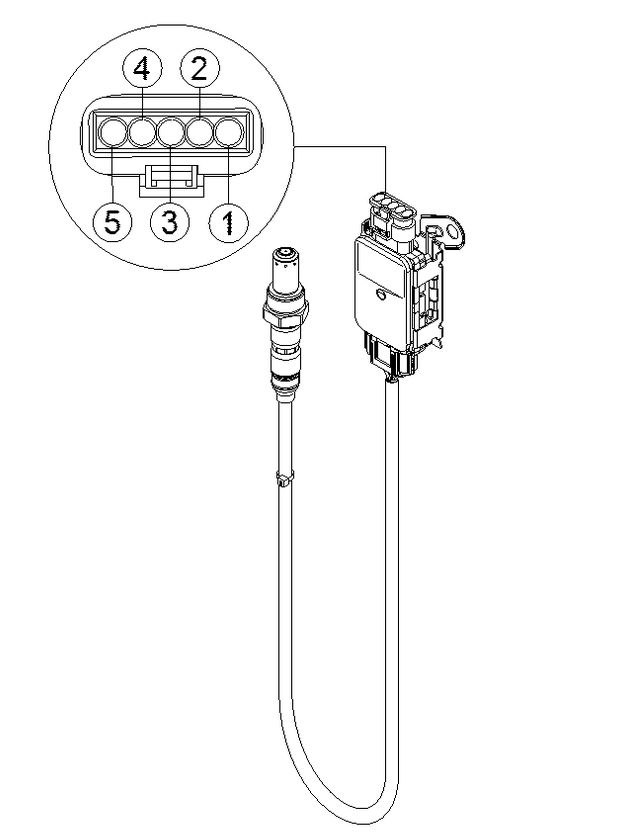
The pin numbers at the sensor:

Pin 1           Supply voltage

Pin 2           Ground

Pin 3           CAN Low

Pin 4           CAN High

Pin 5           ID selection


NOTE: The sensor is a CAN -sensor. The ID selection is made by ground connection.

Nox sensor is shown in figure NOx sensor.

AGCO EMM5 Machine NOx Sensor


Posted on

AGCO EEM5 Machine SCR Line Heaters

AGCO EEM5 Machine SCR Line Heaters

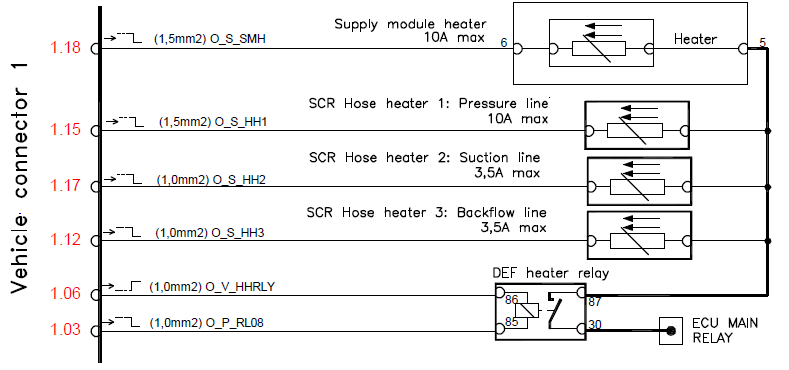
The supply module and the DEF hose heaters are a part of the vehicle DeNox system. The system heating temperature is controlled via the engine ECU.


What you need?

AGCO 2×4 CANUSB

2026 AGCO EDT Diagnostic Software


ECU connection

The pin numbers at the ECU:

K25 Supply module heater relay low side

K92 Pressure hose heater relay low side

K50 Suction hose heater relay low side

K26 Return hose heater relay low side


K20 DEF heater feedback line

K73 DEF heater relay control high side

K94 DEF heater relay control Low side


The SCR heater pinout is shown in figure The SCR heater connections.

AGCO EEM5 Machine SCR Line Heaters


Posted on

How to Use AGCO EDT to Update Flash ECM/ACM Model?

How to Use AGCO EDT to Update Flash ECMACM Model (1)

This instruction show you guide on how to use AGCO 2×4 CANUSB diagnostic kit and AGCO EDT software to do software update flash on ECM/ACM…


What you need?

AGCO 2×4 CANUSB 930203400

2026 AGCO EDT Diagnostic Software


Connect AGCO 2×4 CANUSB diagnostic kit to your vehicle,and run AGCO EDT software.

Select your vehicle machine models correctly.

And the connection and communication build,then go to software flash function

ECUs are updated using Flash downloads. This helps fix issues as well as roll out new or enhanced features

How to Use AGCO EDT to Update Flash ECMACM Model (1)

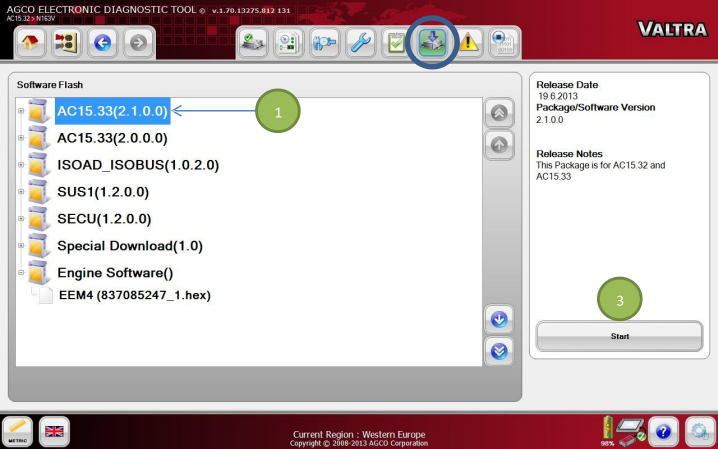
Available software packages are listed under the Software Flash tab.

NOTE: Before flash download, make sure the diagnostic terminal is plugged into an AC power source.


IMPORTANT: Do not interrupt software download activity by unplugging or losing power to the USB connector.


Software Package Flash (Multiple Files)

Select a Software Package (1) to be flashed. Select the Start icon (3) to start batch flashing. The Flash Scripts in each flash file will guide the flash process through instructions.


Individual File Flash

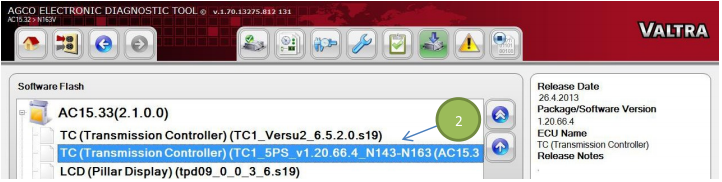
Individual Flash files (2) are shown in a tree structure. Select a file to be flashed and select the Start icon (3). The Flash Script of the selected file from the Package will guide the Flashing through a sequence of steps.

How to Use AGCO EDT to Update Flash ECMACM Model (2)

See the programming procedure for the information on how to update the tractor software from Valtra Info

Posted on

AGCO EEM5 Stage V CORE 75-80 Supply Module Electrical Waste Gate

AGCO EEM5 Stage V CORE 75-80 Supply Module Electrical Waste Gate (2)

The electrical waste gate actuator enables the electrical interaction between the engine and the turbocharger. The electrical waste gate actuator allows very high actuation speeds and accurate boost pressure management.


Related Contents:

AGCO 2×4 CANUSB Interface Diagnostics

2026 AGCO EDT Electronic Diagnostic Tool

AGCO WinEEM5 Power Service Tool 9.0


ECU connection

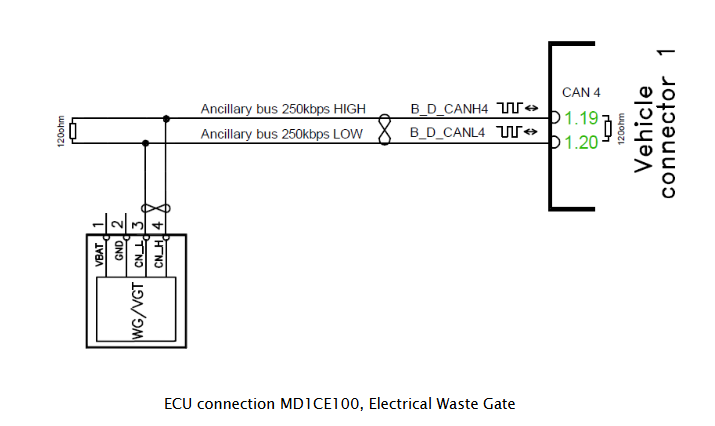
The electrical waste gate uses the CAN bus to communicate with the engine ECU. The power feed is on the vehicle manufacturer’s responsibility.

The pin numbers at the ECU:


MD1CE100        1.20 CAN LOW

MD1CE100        1.19 CAN high


The waste gate connection is shown in figure ECU connection MD1CE100, Electrical Waste Gate.

AGCO EEM5 Stage V CORE 75-80 Supply Module Electrical Waste Gate (1)

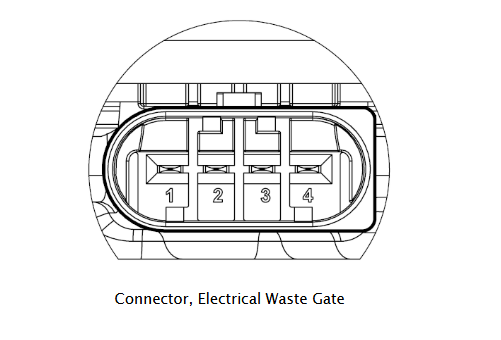
The waste gate connector is shown in figure Connector, Electrical Waste Gate.

AGCO EEM5 Stage V CORE 75-80 Supply Module Electrical Waste Gate (2)

Posted on

How to Solve AGCO Machine SPN 110 Coolant Temperature High Alarm

AGCO Machine

This instruction show you guide on how to solve AGCO machine trouble code SPN 110 coolant temperature high alarm.The measured coolant temperature exceeds the overheating alarm limit.

AGCO Machine

Related Contents:

AGCO 2×4 CANUSB Interface Diagnostics

2026 AGCO EDT Electronic Diagnostic Tool


Failure Mode Indicator

FMI 00 – Above normal operational range – most severe.


Failure Mode

Fault code is stored and warning lamp is activated. The engine will stop after 30 seconds. CAN message indicates, that shutdown is pending.


Possible Cause

  • The fan belt is slipping or the belt is broken
  • Cooling system is not completely filled
  • Water pump is defective
  • Cooling system is clogged
  • Thermostat is defective or removed (double acting thermostat)
  • Thermostat is upside down.
  • Radiator filler cap is not pressure tight
  • Engine is overloaded
  • Coolant temperature sensor wiring is defective
  • Coolant temperature sensor is defective
  • Control unit is defective


Diagnosis and Solution

Find cause for the overheating indication:

  • Check the fan belt and the belt tension.
  • Check the coolant level.
  • Check condition of the radiator.
  • Check the mechanical condition of the engine.
  • Check the coolant temperature sensor wiring, connectors and contact surfaces of the connector pins (possible oxidation).


Coolant Temperature Sensor

Check the coolant temperature sensor operation.

Coolant Temperature Sensor

Check the ECU operation with another EEM3 controller. If the system is functional and the fault is not active with the replacement ECU, then the original ECU is defective.

ECU Replacement


Posted on

AGCO Machine Error Boost Pressure Above Normal SPN 102 FMI 16 Solution

AGCO Machine

Here is the instruction show you guide on how to solve AGCO machine error code SPN 102 FMI 16 boost pressure above normal solution.

AGCO Machine


Related Contents:

AGCO 2×4 CANUSB Interface Diagnostics

2026 AGCO EDT Electronic Diagnostic Tool


Description

The measured boost pressure rises above the warning limit during operation.


Failure Mode Indicator

FMI 16 – Above normal operating range – moderately severe.


Failure Mode

Fault code is stored and warning lamp is activated. Engine speed is limited to 1500 rpm (SL2) and engine power will be reduced (FL1). CAN message indicates active fault. No recovery before system reset.


Possible Cause

  • Too high fuel injection quantity (mg/str) for the engine type (tuning chip)
  • Incorrect nozzles for the engine type
  • Incorrect turbo charger for the engine type
  • Boost pressure wiring is defective
  • Boost pressure sensor is defective
  • Control unit is defective


Diagnosis and Solution

Find cause for the high boost pressure indication:

  • Check, that the control system is configured according to the original specification and no additional devices have been attached.
  • Check that the nozzles and the turbocharger meet the original specifications.
  • Check the boost pressure sensor wiring, connectors and contact surfaces of the connector pins (possible oxidation).


Boost Pressure Intake Manifold Temperature Sensor

  • Check the boost pressure sensor operation.


Boost Pressure Intake Manifold Temperature Sensor

  • Check the ECU operation with another EEM3 controller. If the system is functional and the fault is not active with the replacement ECU, then the original ECU is defective.

ECU Replacement

Posted on

AGCO Machine Trouble Code 95 – SPN 100 – FMI 31 Oil Pressure Sensor Defect

AGCO Machine

This instruction show you guide on how to solve AGCO machine trouble 95 – SPN 100 – FMI 31 oil pressure sensor defect fault.

The measured oil pressure sensor signal is too high (more than 1.3 V or more than 200 kPa (29 psi), when engine is not running.

AGCO Machine

Related Contents:

AGCO 2×4 CANUSB Interface Diagnostics

AGCO EDT Electronic Diagnostic Tool


Failure Mode

Fault code is stored and oil pressure warning lamp is activated. Engine power will be reduced (FL1). CAN message indicates active fault. Engine protection functions on oil pressure are not active. No recovery before system reset.

IMPORTANT: Engine oil pressure protection is not active. The engine may be damaged, if oil pressure is too low.


Possible Cause

Oil pressure sensor wiring is defective

Oil pressure sensor power supply is not correct

Oil pressure sensor is defective

Control unit is defective


Diagnosis and Solution

Check the oil pressure sensor wiring, connectors and contact surfaces of the connector pins (possible oxidation).

Oil Pressure Sensor


Check the 5 V power supply to the sensor.

Oil Pressure Sensor


Check the oil pressure sensor operation.

Oil Pressure Sensor


Check the ECU operation with another EEM3 controller. If the system is functional and the fault is not active with the replacement ECU, then the original ECU is defective.

ECU Replacement

Posted on

How to Use AGCO EDT Diagnostic Test Function?

How to Use AGCO EDT Diagnostic Test Function

Here is the instruction show you guide on how to use AGCO EDT diagnostic software to do diagnostic test functions?


Preparations:

AGCO EDT Electronic Diagnostic Tool 1.128

AGCO 2×4 CANUSB Diagnostics


Steps:

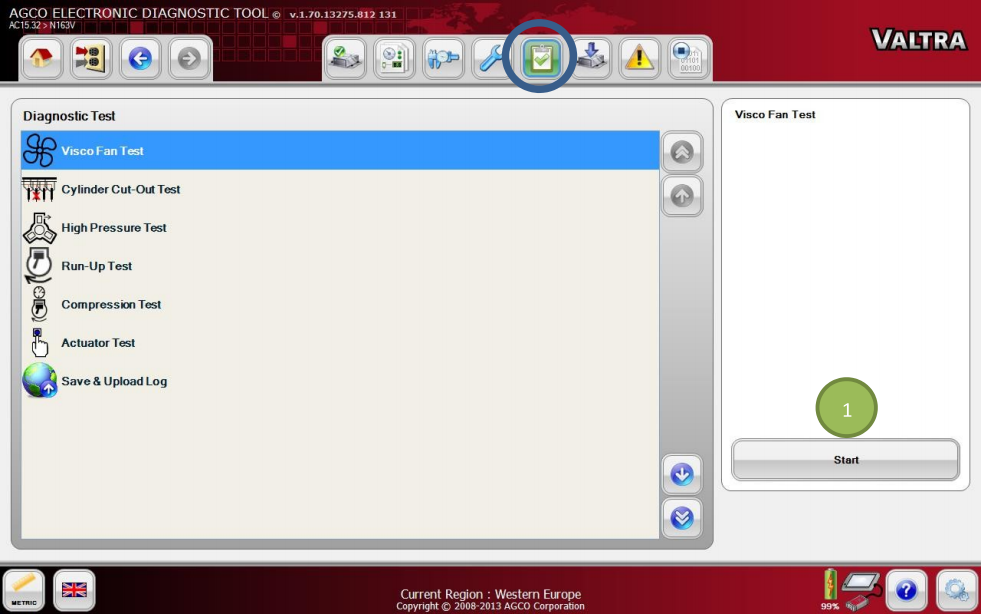
Go to the Diagnostic Test tab and select an item from the list. Press the Start icon (1) to run the Diagnostic Test script of the selected item through a sequence of steps. Follow the instructions given by EDT.

How to Use AGCO EDT Diagnostic Test Function

Available diagnostic tests for Valtra Suolahti vehicles vary depending of the tractor model:

– Hydrostatic Unit Test (Direct only)

– Visco Fan Test

– Cylinder Cut-Out Test

– High Pressure Test

– Run-Up Test

– Compression Test

– Actuator Test

– Save & Upload Log


NOTE:See the machine special instructions for the information on how to use the diagnostic tests from Valtra Info.

Posted on

How to Use AGCO EDT Calibration Function for AGCO Machine

AGCO EDT calibration function is very important for AGCO machine,it give your permission to change calibration scripts in selected system.Here autoepccatalog.com show you guide.


What you need?

AGCO EDT 2024

AGCO 2×4 CANUSB


Main Steps:

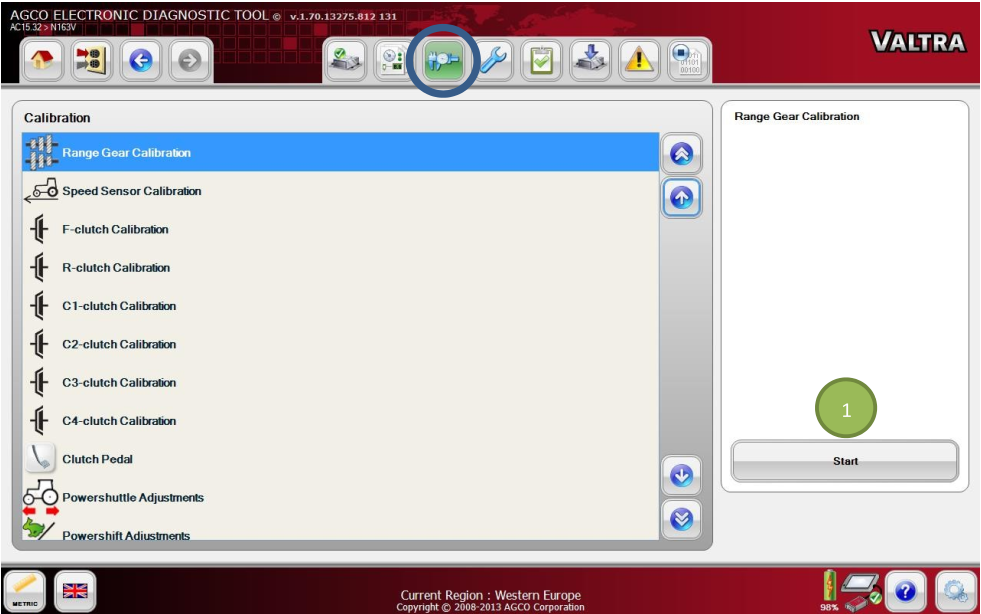
Go to the Calibration tab and select an item from the list. Press the Start icon (1) to run the Calibration script of the selected item through a sequence of steps. Follow the instructions given by EDT.

Available calibrations for Valtra Suolahti vehicles vary depending of the tractor model:
– Main Gear Calibration (Versu / Direct / Hitech 5PS)
– Range Gear Calibration (Versu / Direct / Hitech 5PS)
– Hydrostatic Unit (Direct only)
– Speed Sensor Calibration
– F- clutch Calibration
– R-clutch Calibration
– C1-clutch Calibration (Versu / Hitech)
– C2-clutch Calibration (Versu / Hitech)
– C3-clutch Calibration (Versu / Hitech)
– C4-clutch Calibration (Versu / Hitech 5PS)
– Clutch Pedal Calibration
– Powershuttle Adjustments
– Powershift Adjustments (Versu / Hitech)
– Injector Calibration
NOTE: See the machine special instructions for the information on how to use the calibrations from Valtra Info.