This instruction show you guide on how to use AGCO 2×4 CANUSB diagnostic kit and AGCO EDT software to do software update flash on ECM/ACM…
What you need?
2026 AGCO EDT Diagnostic Software
Connect AGCO 2×4 CANUSB diagnostic kit to your vehicle,and run AGCO EDT software.
Select your vehicle machine models correctly.
And the connection and communication build,then go to software flash function
ECUs are updated using Flash downloads. This helps fix issues as well as roll out new or enhanced features
Available software packages are listed under the Software Flash tab.
NOTE: Before flash download, make sure the diagnostic terminal is plugged into an AC power source.
IMPORTANT: Do not interrupt software download activity by unplugging or losing power to the USB connector.
Software Package Flash (Multiple Files)
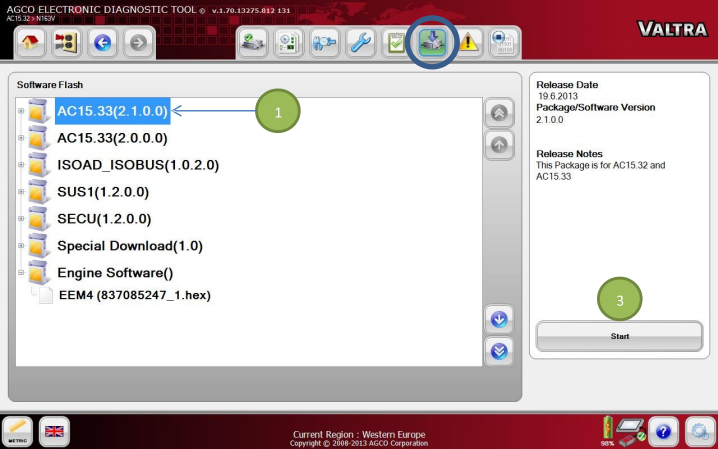
Select a Software Package (1) to be flashed. Select the Start icon (3) to start batch flashing. The Flash Scripts in each flash file will guide the flash process through instructions.
Individual File Flash
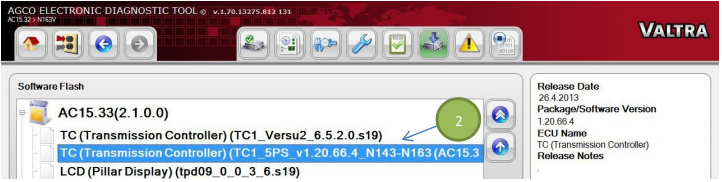
Individual Flash files (2) are shown in a tree structure. Select a file to be flashed and select the Start icon (3). The Flash Script of the selected file from the Package will guide the Flashing through a sequence of steps.
See the programming procedure for the information on how to update the tractor software from Valtra Info